K Electric Bill Check Online
K-Electric has made its digital system significantly faster in 2026. Now you don't need to stand in long lines or go to any office to view your bill. You can generate your bill online using the methods described below and see it instantly.
Check K Electric Bill by Account Number
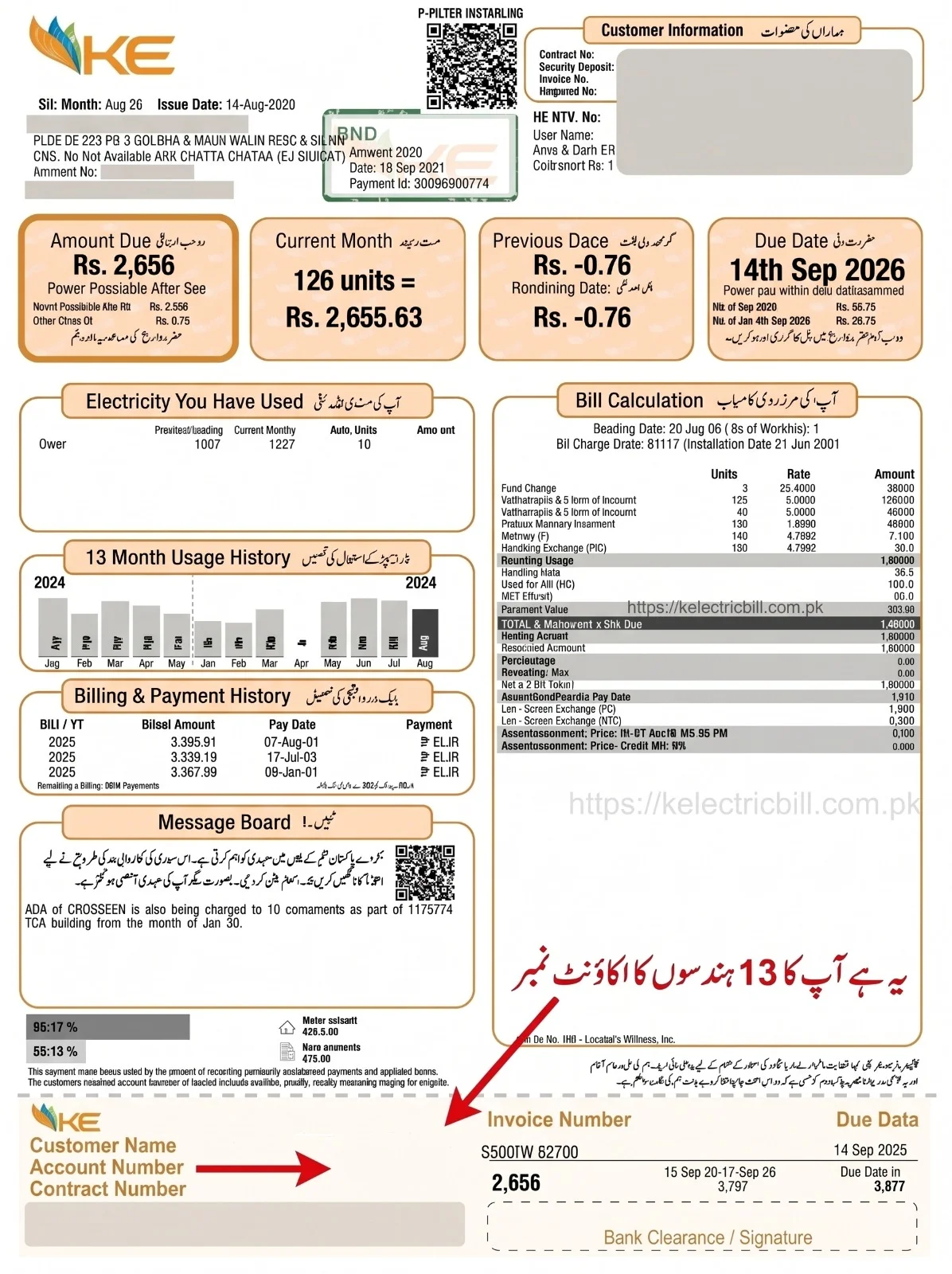
The best official way to check your K Electric Bill online is with your 13-digit Account Number. This number is the most important ID for your entire connection. It identifies which city or village you live in.
It is now printed in large letters on the far left of the tear-off counterfoil slip at the bottom of your bill. Account Number 0400xxxxxxxxx.
You simply enter this account number into the toolbox provided above.
If you have an email address, enter it in the email field. If you don't, that's no problem.
Then enter your phone number. This is optional as well, and if you have one, enter it, and if not, it's no big deal.
Then, look at the captcha code and enter it exactly as shown in the box.
Now you just need to click on “View Bill.”
Your 6-month bills will then appear on the screen. Simply download the bill for the month you want. As soon as it saves, it will open on the screen, and you can view your latest bill right away.
Check K Electric Bill by Consumer Number
Many people ask how to check a bill using the Consumer Number, but here's a big secret you should know so you don't waste your time.
On your K-Electric bill, next to your name, there's an 8-character Contract Number (LA685803). However, you cannot check your bill with this number. This number is for your record only. To check your bill online, you must have your 13-digit Account Number.
Check K-Electric Bill by Meter Number
There is no official option on the white page where you can enter a meter number to retrieve a bill. Because whenever a meter malfunctions or is replaced, the meter number changes, whereas the Account Number always remains the same.
If your bill is lost and you only remember your meter number, don't worry. Call K-Electric's helpline at 118. Give them your meter number and your home address, and they will check their system and tell you your 13-digit Account Number. Then you can check your bill online.
How to Download K Electric Duplicate Bill
Downloading a duplicate K Electric Bill online is very easy. Many customers are often confused about how to save their bill, but now you don't need to worry, because here you'll find step-by-step instructions on how to download your bill. You just need to follow the simple steps.
Download K Electric Bill in PDF
First, open your bill using the method provided above.
As soon as the bill opens, you will see a “Download” or “Print” option below.
Clicking on it will save the high-quality PDF file to the Documents folder in your phone's file manager, where you can easily view it.
Now you can go to any shop to get it printed and use it to easily submit your bill in person at the bank or any other location.
Get K Electric Bill on WhatsApp
If you want to get your bill directly on WhatsApp, this is the best method to follow.
Save K-Electric's official WhatsApp number, 0348-0000118, in your mobile phone. Make sure it has a green checkmark.
Open WhatsApp and type “Hi” to send.
A menu will appear. Select “Duplicate Bill” and enter your 13-digit Account Number: K-Electric will immediately send your PDF bill to WhatsApp.
Check Your Latest K Electric Bill Online
If you want to check your bill with one click every month, here's a simple way.
Download the “KE Live” app from the Google Play Store or Apple App Store.
Once you register, as soon as your new bill is ready each month, you'll receive a notification on your mobile and can view your brand-new bill with a single click.
K-Electric Online Bill Payment & The 5 QR Codes
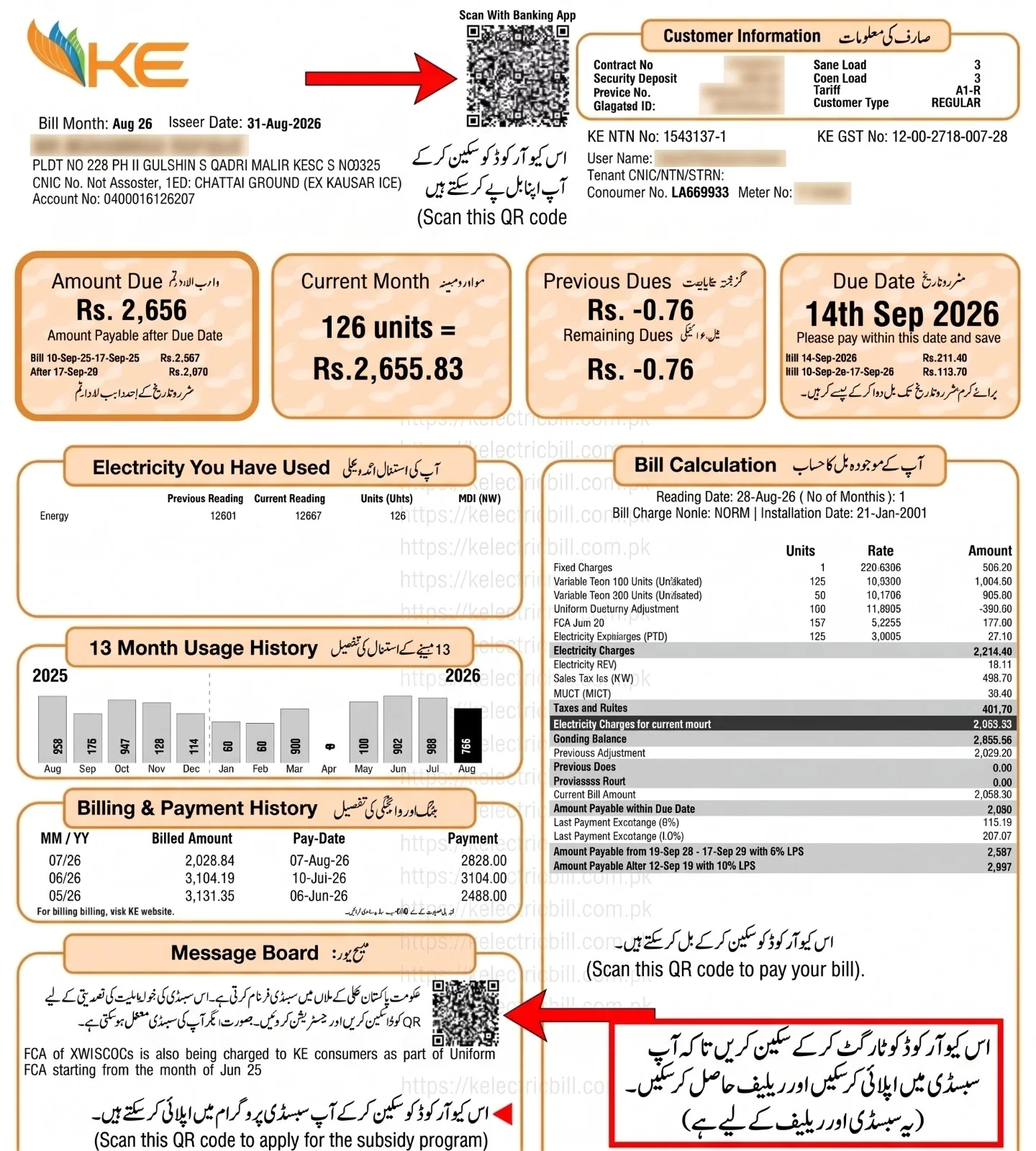
K-Electric has provided five separate QR codes on the new bill for the convenience of its valued customers so you can scan them to pay your bill, apply for subsidy programs, file load-shedding complaints, and get these tasks done in no time. Below, we have provided details of each QR box, its function, and its exact location, which you can see.
Payment QR Code (For Bill Payment)
⚡ Location
Top Center
This is provided at the very top center of your bill's front page.
⚡ Function
Instant Payment
Scan this code with your banking app or Easypaisa/JazzCash. It will automatically fetch your information and display the correct amount on the screen. You just need to enter your PIN and confirm the payment.
Apply for the subsidy program
⚡ Location
Message Board
It's on the front page of your bill, on the left side, inside the “Message Board.”
⚡ Task
Form Submission
You just need to scan it using the Google Camera on your mobile. A link will appear just click it, fill in your details in the form that opens, and submit. Starting next month, clear relief will be applied to your bills if you fall into a protected category and are eligible for this scheme.
Consumer Guidance QR Code (For Rules and Information)
⚡ Location
Center Left (Back)
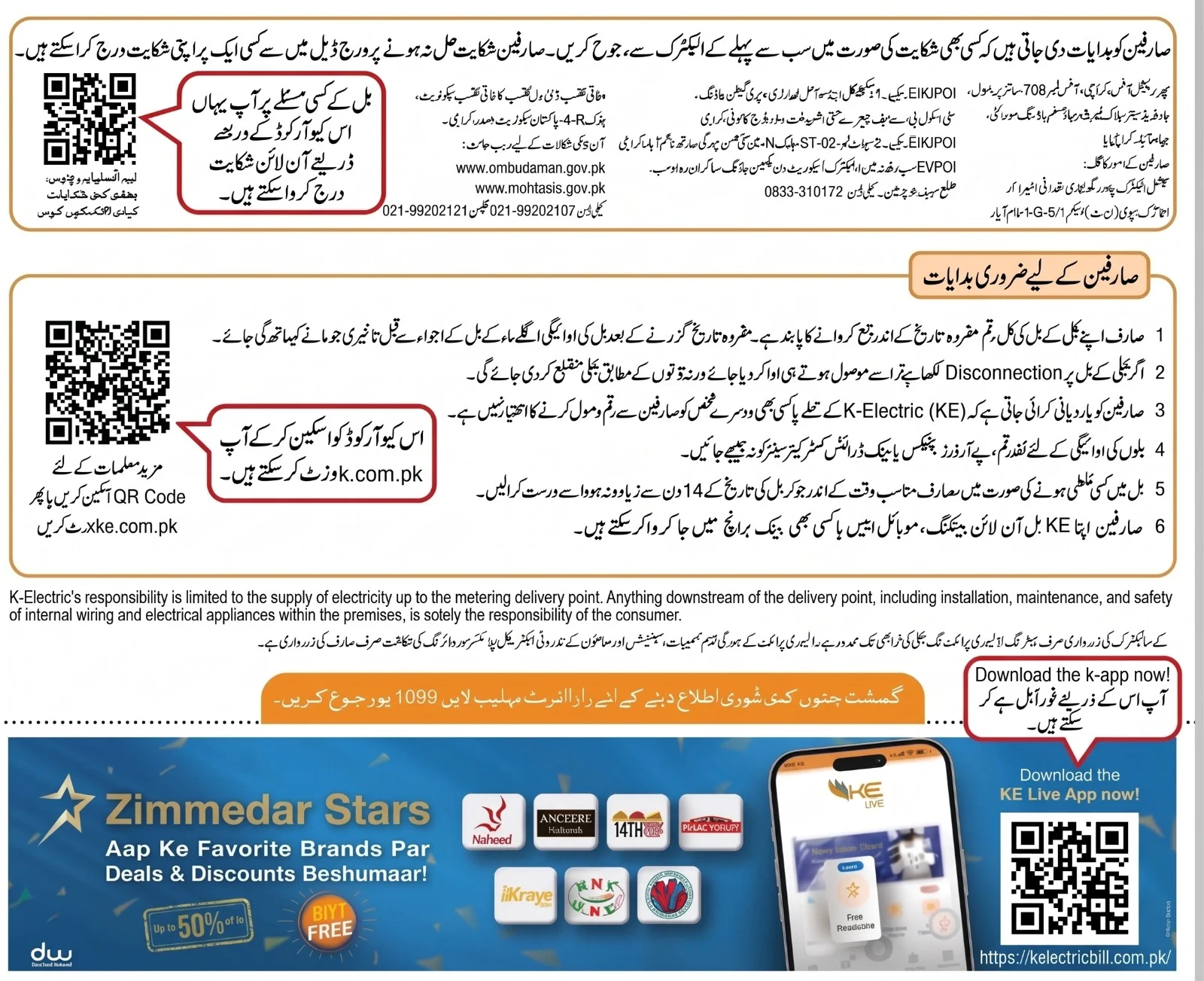
On the back of your bill, in the center on the left side.
⚡ Purpose
Official Rules & Help
If you need to understand the bill's rules or details about taxes, you can scan this code to open K-Electric's official help portal and read every rule at your convenience.
KE Live App QR Code (To Download the App)
⚡ Location
Bottom Right (Back)
It's also on the back of your bill, in the bottom right corner.
⚡ Purpose
App Download
Scan this code, and you'll be taken directly to the App Store, where you can download the official K-Electric KE Live App in an instant.
Online Complaint and Federal Audit Officer's QR Code
⚡ Location
Top Left Box (Back)
On the back of your bill, inside the top-left box where the addresses of the Federal Audit Officer and NEPRA offices are listed.
⚡ Functionality
File Formal Complaint
If K-Electric does not resolve your electricity or billing issues, you can scan this QR code. It will take you directly to the official portal where you can easily file a formal complaint against K-Electric.
K Electric Bill Payment Online
Now you don't have to stand in the sun for hours or go through the hassle of depositing your K-Electric bill. KE has made its payment methods extremely easy and digital for the convenience of its customers, so you can pay your bill instantly from home using your mobile. If you don't use digital apps, you also have the option of a physical payment method. We've explained each method here in steps to make it easier for you.
How to Pay K-Electric Bill via Easypaisa App
1
Open app:
Open the Easypaisa app on your mobile and log in.
2
Select Bill Payment:
On the home screen, click the “Bill Payment” option.
3
Choose Electricity:
Then, on the next screen, select the “Electricity” icon.
4
Choose Company:
Then, from the list of all companies, click on “K-Electric”.
5
Enter Account Number:
Enter your 13-digit Account Number and click Next.
6
Verify and Pay:
Your name and the bill amount will appear on the screen. Verify it and click “Pay Now.” Your bill is now paid.
How to Pay K Electric Bill via JazzCash App
Here is an easy way to pay your bill using the JazzCash app:
1
Log In App:
Open the JazzCash app and log in with your secure MPIN.
2
Go to Utility Bills:
In the Main Menu, click the “Utility Bills” button.
3
Select Electricity:
Select “Electricity” from the available bill categories.
4
Pick KE:
Select “KE” (K-Electric) from the company list.
5
Provide Account Number:
Enter your 13-digit Account Number and click the arrow button.
6
Confirm Amount:
Check the bill amount, enter your 4-digit MPIN, and confirm the payment.
How to Pay K Electric Bill via Banking Apps (HBL, Meezan, Alfalah, etc.)
If you want to pay directly from your account using your bank's official app, just follow this method:
1
Access Bank App:
Open your preferred bank app and log in.
2
Find Bill Management:
Go to the menu and click on “Bill Management” or “Utility Payments.”
3
Add K-Electric:
Click on “Add New Bill” and select “K-Electric” from the list.
4
Link Account Number:
Enter your 13-digit account number to add your consumer profile.
5
Fetch Bill Details:
Your current payable bill will be displayed on the screen.
6
Authorize Payment:
Click “Pay Bill,” verify the OTP sent to your phone, and your bill will be paid.
How to Pay via Smart QR Code Scan Method
If you don't want to type the account number manually, this is the fastest method:
1
Launch Payment App:
First, open your banking app, Easypaisa, or JazzCash app.
2
Open QR Camera:
Click the “Scan QR” camera option within the app.
3
Scan Top QR Code:
Point your mobile camera at the QR code located in the top-center of the bill.
4
Auto-Load Details:
As soon as the code is scanned, your account number and bill amount will automatically load.
5
Instant Confirmation:
Just click “Confirm Payment” and your bill will be paid instantly without any typing errors.
How to Pay K-Electric Bill via Daak Khana (Post Office) or Bank Branches
1
Get Physical Print:
Get a clear physical printout of your new digital bill from any local print shop.
2
Visit Local Branch:
Go to your nearest Pakistan Post Office (Daak Khana) or any commercial bank branch (NBP, ABL, HBL, etc.).
3
Pay Cash Counter:
At the cashier's counter, present your bill printout and pay the amount in cash.
4
Collect Paid Receipt:
The cashier will cut out the bottom counterfoil slip for their record, stamp “PAID” on your remaining portion, and return it to you. Keep this receipt safe to prove your payment on the spot if any official comes to inspect your meter.
How to Read Your K-Electric Bill (According to the New Layout)
You've probably noticed that our bills have a lot written on them not just the amount, but many other important details that we tend to ignore, which is completely wrong. As a responsible consumer, we should read them carefully to find out exactly how much the bill is and how many charges are being applied. The important and necessary points are mentioned here. You can see them.
Account Number (13-Digits)
This is printed in large letters on the very bottom left side of the bill. You need this number to check and download your bill online.
Contract & Meter Number
In the top-right corner of the bill there is a “Customer Information” box. Inside this box you will find your 8-digit Contract No. and your physical Meter No.
Reading & Due Dates
In the center-right of the bill there's a “Bill Calculation” section. Here you'll find the Reading Date the day the meter reader visited, the Issue Date, and the Due Date (the final date to pay the bill) clearly written.
Actual Meter Snapshot
On the back of the bill, a real photo of your physical meter is printed taken by the meter reader while recording the reading so you can verify for yourself that the reading wasn't taken incorrectly.
Bill Amount & Taxes
On the left side of the bill, in large orange boxes, you'll find your total payable amount. In the Bill Calculation section, further down, you'll see details of taxes such as Electricity Duty, Sales Tax, and FPA (Fuel Price Adjustment).
Zimmedar Stars Reward
On the back of the bill, at the very bottom, there's a “Zimmedar Stars” banner. If you pay your bill before the due date, you become a Star Customer and receive discount vouchers of up to 50% on brands in the KE Live App.
K Electric Bill History
If you want to see how much you've paid in bills over the past months, you can easily retrieve your records. K-Electric provides you with the past 13 months' history both on your bill and online.
🔹 Record on the Bill:
On the front page of your bill, there is a box labeled “Billing & Payment History.” In it, the billed amounts for the past 13 months and their payment dates are clearly written.
🔹 Online 6-Month Record:
When you enter your 13-digit account number and check your bill on the online portal, you'll see an option to download your previous six months' bills.
K Electric Bill App and E-Billing
To save you the hassle of dealing with paper bills, K-Electric has greatly improved its digital services. Now you can track your complete record and billing status live through the mobile app. If you want to take advantage of this, follow these steps.
🔹 KE Live App Download:
Download the official KE Live app from the Google Play Store or the App Store. By registering, you can view the live load-shedding schedule, see your meter reading photo, and file an online complaint. You can also stay updated at any time.
🔹 E-Bill Service:
By activating the e-bill service in the app, you'll receive a link to your bill via SMS and email as soon as it's generated each month, so you don't have to wait for a paper bill. Actually, you should definitely download this app because you won't have to worry, and the company itself will notify you and remind you to pay your bill.
K Electric Bill Issues and Complaints
If your bill is unusually high or you believe the reading is incorrect, you shouldn't stay silent but should take immediate action. K-Electric provides you with full facilities to request bill corrections and file complaints. If you face such an issue, follow these instructions immediately.
🔹 Check the Meter Snapshot:
First, look at the meter reader's photo on the back of your bill and compare it with the reading on your physical meter. If the reading was indeed taken incorrectly, you can have your bill adjusted.
🔹 How to Register a Complaint:
You can file a “Billing Complaint” by calling K-Electric's helpline at 118 or through the KE Live App. They will resolve your issue immediately.
K-Electric Bill Installments & Relief Options
If your bill this month is higher than you expected and you don't have the full amount to pay at once, there's no need to worry. K-Electric offers its customers who are having difficulty paying their bills the option to convert their bill into easy installments. So you don't face any difficulty. The installments are explained below, along with how you can apply for them.
🔹 3 Easy Installments:
If your bill is very high, you can go to your nearest K-Electric Customer Care Center (IBC) and, with a simple request, have your bill converted into 3 easy installments.
🔹 Before Due Date Condition:
Remember that bill installments are only available if you visit the customer center before the due date printed on your bill. Installments are not processed after the due date has passed.
🔹 No Late Payment Charges:
Once your bill is successfully converted into installments, the late payment surcharge (fine) is waived, and you can comfortably pay your installment each month.
K-Electric Peak Hours and Load Shedding
The easiest way to lower your electricity bill in Karachi is to understand the peak hours. If you grasp this, your bill will never be high, because during this time the per-unit rate is charged at almost double. If you use the AC, fridge, iron, or washing machine during these 4 hours. Avoid running the AC, refrigerator, iron, washing machine, or grass-cutting machine during these four hours, and your bill will automatically be cut in half. According to K-Electric's official system, the complete table of seasonal timings is provided below. If you use very little electricity during these hours, you can certainly reduce your bill by up to 40%.
Official K-Electric Peak Hours 2026
| Months / Seasons |
Peak Pricing Hours |
Off-Peak Hours (Sasti Bijli) |
| April to October |
6:30 PM to 10:30 PM |
Remaining 20 Hours of the day |
| November to March |
6:00 PM to 10:00 PM |
Remaining 20 Hours of the day |
K-Electric Solar & Net Billing Framework
For those who have installed solar panels on their homes in Karachi and its surrounding areas, or are considering doing so, NEPRA has completely overhauled the entire system as of 2026. The old rules have been permanently discontinued, so it's very important to understand the new rules carefully so you don't suffer any loss. You can see what changes have been made to solar billing:
☀️ From Net Metering to Net Billing:
Under the new rules, NEPRA has replaced the old 1:1 unit system (where you got one free unit for every unit you supplied) with a “Net Billing” system.
☀️ New Export Rate:
Now, for the excess electricity your solar system sends to the grid (K-Electric) during the day, you will receive a credit rate of approximately Rs. 11 per unit.
☀️ Import Rate Will Remain Standard:
At night or when it's cloudy and you draw power from K-Electric, you'll pay the same standard rate (Rs. 45 to over Rs. 60 per unit) that regular consumers pay.
☀️ Relief for Existing Users:
Those who have an old agreement in place from before February 9, 2026, will continue to pay the old rates until their contract expires. New rules will apply to those installing new solar systems.
Official K-Electric Area Divisions & Integrated Business Centers (IBCs)
| Serial No. |
Division / Area Name |
Covered Key Localities (Shamil Ilaqay) [location - K-Electric] |
| 1 | DHA / Defence | DHA Phases 1 to 8, Phase 2 Extension, Clifton Block 1-5 |
| 2 | Clifton | Bath Island, Shireen Jinnah Colony, Boat Basin, Mai Kolachi |
| 3 | Saddar | Saddar Town, Lines Area, Empress Market, Regal Chowk |
| 4 | Garden | Garden East, Garden West, Makki Masjid Area, Soldier Bazar |
| 5 | Lyari | Lyari Quarters, Khadda Market, Dhobi Ghat, Agra Taj Colony |
| 6 | Gulshan-e-Iqbal I & II | Civic Center, Hassan Square, National Stadium, Block 1-13 |
| 7 | Gulistan-e-Johar I & II | Johar Chowrangi, Block 14-20, Pehelwan Goth, Kamran Chowrangi |
| 8 | Gadap | Scheme 33, Saadi Town, Super Highway Localities, Hadiabad |
| 9 | Federal B. Area (FB Area) | Water Pump, Aisha Manzil, Block 1-22, Al-Noor Powerhouse |
| 10 | Liaquatabad | Teen Hatti, Dak Khana Chowrangi, Gharibabad, FC Area |
| 11 | Nazimabad | Gol Market, Rizvia Society, Nazimabad No. 1 to 5 |
| 12 | North Nazimabad | Hyderi Market, Sakhi Hassan, Five Star Chowrangi, Blocks A to N |
| 13 | North Karachi | Power House, UP More, Sector 11, Al-Noor Barrier Area |
| 14 | New Karachi | Sector 5, Khawaja Ajmeer Nagri, Sindhi Hotel Area [location - K-Electric] |
| 15 | Orangi Town I & II | Banaras, Orangi Sectors, Football Chowrangi, Mominabad |
| 16 | Baldia Town | Saeedabad, Baldia Sectors, Rangers Office Locality |
| 17 | SITE Industrial Area | SITE Factory Areas, Habib Bank Chowrangi, Pak Colony |
| 18 | Korangi | Korangi Crossing, Korangi 1 to 6, Darul Uloom Area |
| 19 | Korangi Industrial Area (KIMZ) | Sector 22, Near Imtiaz Store Industrial Belt, Landhi Border |
| 20 | Landhi | Landhi Babar Market, Jam Nagar, Landhi 1 to 6 |
| 21 | Shah Faisal Town | Shah Faisal Colony 1 to 5, Green Town, Natha Khan |
| 22 | Malir | Malir Halt, Malir Cantt Border, Kala Board, Saudabad |
| 23 | Bin Qasim | Steel Town, Gulshan-e-Hadeed, Pipri, Cattle Colony |
| 24 | Kiamari | Kiamari Docks, West Wharf, Mauripur, Baba Bhit Island [location - K-Electric] |
| 25 | Drigh Road | Drigh Road Bazar, PAF Base Surroundings, Faisal Cantonment [location - K-Electric] |
| 26 | Surjani Town | Surjani Sectors, Taiser Town, Khuda Ki Basti [location - K-Electric] |
| 27 | Dhabeji & Gharo (Sindh) | National Highway Border Towns, Water Pumping Stations [K-Electric - Wikipedia] |
| 28 | Hub (Balochistan) | Hub Industrial Zone, Chowki, Border Localities [K-Electric - Wikipedia] |
| 29 | Vinder (Balochistan) | Goth Hussain, Lasbela Coastal Highway Areas [location - K-Electric][K-Electric - Wikipedia] |
| 30 | Uthal & Bela (Balochistan) | Far-flung Customer Facilitation Areas (Balochistan District) [K-Electric - Wikipedia] |
K-Electric Bill FAQs
Q1: How to check a K-Electric duplicate bill online?
Ans: Enter your 13-digit Account Number in the bill checker box above, fill in the captcha code, and click “Check Now.” Your duplicate bill will open immediately on the official site.
Q2: Can a K Electric Bill be checked with a Consumer Number?
Ans: No, the K-Electric online system does not show a bill with just the Consumer Number. You must enter the 13-digit Account Number in all cases.
Q3: What is the official WhatsApp number to check a K-Electric bill?
Ans: The official and verified K-Electric WhatsApp number is 0348-0000118. Send “Hi” to this number, and they will send your duplicate bill as a PDF.
Q4: How to download the K-Electric bill PDF?
Ans: When the bill appears on the screen, click the “Download” button below. Your bill will be saved to your phone's storage, where you can view it at any time.
Final Thought
Now it's very easy to check your K Electric Bill and pay it from your mobile. You don't have to stand in line at the bank or wait for a paper bill. Instead, you can pay and check your bill in just a few seconds, hassle-free. You just need to remember the peak hours and methods mentioned above so that your bill will be lower and you can also avoid fines.
We are not the official K-Electric website or its representatives. We have only tried to provide you with real information so that you can follow the correct path and avoid any loss. All the data and the bill-checking tool on our site are completely linked to the official K-Electric API, so you can easily check your bill for free without any errors.